


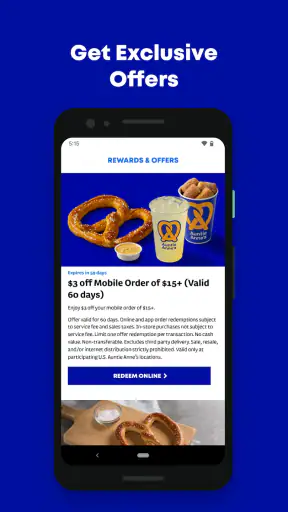
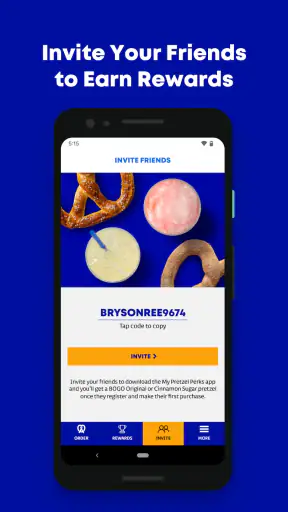
I spent time with Auntie Anne’s Rewards as a food-and-drink app, looking at it not only as a way to interact with a pretzel brand but also as a tool people may use in busy malls, food courts, and quick takeaway situations. My overall impression is that it is most useful when you already visit Auntie Anne’s and want a more direct mobile experience than relying on memory, a paper receipt, or a general food-ordering app.
The app is free, developed by Auntie Anne’s, and aimed at Everyone. It has been available since late 2013, while the current release is version 8.7 and requires iOS or Android 11 or later. Its average rating is 4.5 from roughly eleven thousand ratings, and it has passed one million installs. Those figures suggest a well-established service rather than a short-lived experiment, although popularity alone does not guarantee that every screen will suit every user.
How clearly the app supports different users
Readability and navigation in everyday use
The first thing I look for in a rewards app is whether I can understand its purpose quickly. A loyalty tool should not make me hunt through unrelated menus before I can see what matters. In this case, the central idea is easy to grasp: this is the official mobile companion for Auntie Anne’s, focused on the brand’s own customer experience rather than acting as a general restaurant directory.
That focus is helpful for people who prefer a narrow, predictable app. You are not faced with a large marketplace containing dozens of restaurants, delivery categories, and competing offers. If your goal is to interact with Auntie Anne’s, the dedicated environment can feel less cluttered than a broad delivery platform. The trade-off is that the app has limited value when you are comparing several nearby food options or trying to manage an order from a different restaurant.
I also think the distinction between browsing and completing an action matters here. A user may open the app while standing in line, while walking through a shopping center, or while deciding whether to stop for a snack. In those moments, clear labels and a short path to the relevant account or rewards area are more valuable than decorative presentation. I would use it with the expectation that it is a brand-specific utility, not a complete food-planning assistant.
For readers who rely on larger text, strong contrast, screen magnification, or spoken content, the practical experience will depend partly on the phone’s own accessibility settings and how each app screen responds to them. I would recommend increasing text size before a busy visit and checking whether important labels remain visible rather than assuming every interface element will scale perfectly. That small test is worthwhile because rewards information is only useful if you can identify it confidently at the counter.
One useful habit is to open the app before reaching the store instead of waiting until you are being served. This gives you time to sign in, inspect the relevant screen, and resolve any confusing step without holding up the queue. It also reduces the need to read small text while moving through a noisy location. The best accessibility improvement may be preparing the app before the purchase moment, especially for anyone who finds rapid navigation stressful.
Motor and sensory considerations
Food-court environments create a particular challenge for mobile apps. People may be carrying a drink, holding a child’s hand, wearing gloves, or trying to operate a phone with one hand. A rewards app can be convenient in that setting, but convenience depends on how many taps are needed and whether the user can pause safely between them.
I would not treat the app as something that must be operated while walking. The safer and calmer workflow is to stop at the side of the queue, prepare the account screen, and then present the phone when needed. That approach helps users with limited dexterity because it avoids hurried tapping, repeated backtracking, and the pressure of making a decision while other customers wait.
For users with tremors or reduced precision, large system-level touch settings may help, but they can also create an unexpected problem: enlarging content may cause buttons or information to require more scrolling. That is why I would test the exact flow at home. If the app is being used primarily for rewards, finding the shortest reliable route is more important than exploring every screen.
Sensory load is another consideration. A shopping center may include bright signs, background music, conversations, and strong food smells. Even a straightforward app can become difficult to use when the surrounding environment is overwhelming. I found the idea of preparing the app in a quiet place more practical than trying to complete everything at the counter. Users who are sensitive to noise or visual distraction may also prefer visiting at a quieter time, when they can focus on the phone and staff interaction without rushing.
People who use screen readers should pay attention to whether the reading order makes sense on the particular device. If controls are announced out of sequence, a visual user may still manage by scanning, while a blind or low-vision user may need more time or assistance. I cannot treat the app as universally accessible simply because it is official. The sensible approach is to try the key rewards workflow with the assistive technology you use every day before depending on it during a purchase.
Situational access: when it helps and when it does not
A realistic example is a parent passing through a mall after school. There is a short break before the next activity, the family wants a quick snack, and the parent does not want to compare delivery services or create a new account on a broad restaurant platform. Having the dedicated app ready can make the brand-specific part of the visit more manageable. The parent can check the relevant account information before reaching the counter and keep attention on the children rather than searching through a general food app.
Another useful situation is a regular customer who visits several Auntie Anne’s locations. A dedicated rewards app is easier to justify for that person than for someone who buys a pretzel only once a year. Repeated visits give the app a continuing role, while occasional visitors may find that the setup and account management are more effort than the purchase deserves.
It may also suit people who prefer a digital record instead of keeping paper receipts. That can be helpful for users who organize purchases on their phone or who find physical slips easy to lose. At the same time, anyone who is uncomfortable managing accounts, passwords, or phone-based rewards should not feel obliged to use it. The traditional in-store experience remains the better choice when simplicity means paying and leaving without another digital step.
Compared with a general delivery or restaurant-discovery app, Auntie Anne’s Rewards has a narrower purpose. A broad alternative is better when you want to compare menus, delivery fees, dietary information across multiple businesses, or several nearby restaurants at once. The dedicated app is better when your decision is already made and you want the brand’s own rewards experience. That is an important trade-off: specialization can reduce clutter, but it also reduces flexibility.
It is also different from simply using a mobile browser. A browser may be preferable for a one-time visit because it avoids installing another app and can be easier to abandon afterward. The dedicated app makes more sense for repeat customers who want a persistent place for their Auntie Anne’s activity. I would not install it solely because the brand is nearby; I would install it if the frequency of visits makes the extra app worthwhile.
Practical friction and remaining barriers
The biggest barrier is the app’s limited scope. It is not a general nutrition planner, a universal restaurant wallet, or a replacement for every ordering method. If you need a wide choice of restaurants or a single place to manage several brands, another service will probably fit better. That limitation is not a flaw in itself, but it should be clear before you spend time setting it up.
Device compatibility can also matter. The requirement for iOS or Android 11 or later means people using older phones may be excluded from the current experience. An older device can be especially important for users who keep a familiar phone because its physical controls, display, or assistive setup work well for them. Upgrading solely for a pretzel rewards app would not be a sensible choice.
There is a social barrier too. Some users may feel uncomfortable presenting a phone at a counter, particularly if the screen is difficult to read, the device is shared with a family member, or the person needs extra time to navigate. I would treat staff interaction as part of the workflow rather than expecting the app to remove every accessibility challenge. Preparing the correct screen in advance and explaining briefly what assistance is needed can make the exchange less stressful.
Account recovery and phone access are practical concerns for any rewards service. If your device battery is low, your connection is unreliable, or you cannot comfortably authenticate at the moment of purchase, a digital reward may be harder to use than a physical card or ordinary payment method. My advice is not to make the app your only plan for a time-sensitive visit. Keep the purchase simple when the phone is not cooperating.
There is also a privacy and attention trade-off that comes with installing any branded loyalty app. Even when the app is free, you are choosing to maintain another digital relationship. Users who minimize apps, notifications, or accounts may reasonably decide that the occasional benefit is not worth the extra mental load. In my view, that is the clearest group that should skip it: people who rarely visit Auntie Anne’s or who already feel overloaded by loyalty programs.
Who will get the most from it?
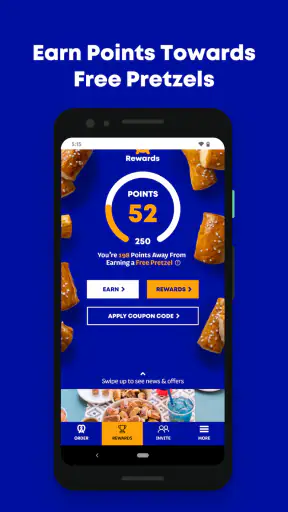
I would recommend it first to regular Auntie Anne’s customers who are comfortable using a smartphone and want a dedicated rewards experience. It is also a reasonable option for families, commuters, and mall visitors who prefer preparing information before reaching a busy counter. The app’s focused identity makes more sense for these users than a large restaurant platform that includes many services they do not need.
I would be more cautious for people with older phones, limited data access, significant motor difficulties, or visual needs that require highly predictable screen-reader behavior. That does not mean they cannot use it. It means they should test the important path under real conditions and keep an alternative plan. An app can be officially supported and still be tiring or unreliable for a particular person.
For someone who buys from Auntie Anne’s only occasionally, I would compare the effort honestly. Installation, account setup, remembering the app, and finding the right screen can outweigh the convenience of a single visit. In that case, a normal in-store purchase or a broader food app may be the better choice. The dedicated app earns its place when repeated use turns those initial steps into a routine.
My inclusive verdict after using it
My view is that Auntie Anne’s Rewards is a practical, focused food-and-drink app rather than a universal solution. It can make repeat visits more organized, especially when you prepare before entering a noisy or crowded location. Its free price and Everyone rating remove two obvious barriers, while the established user base shows that many customers find the concept worthwhile.
Still, I would not describe it as automatically accessible for every ability or situation. Readability, touch precision, spoken navigation, device age, and the pressure of a busy counter all affect the experience. The most reliable approach is to test the app with your own phone settings, open the needed screen ahead of time, and avoid depending on it when your battery, connection, or concentration is limited.
My recommendation is simple: install it if Auntie Anne’s is already part of your routine and you want a brand-specific rewards tool. Skip it if you want restaurant comparison, broad delivery control, or a completely account-free visit. For the right user, it is a useful companion; for everyone else, its narrow purpose means the ordinary alternative may be easier.


